Silver keeps a Destiny: Rising account moving. It buys the Lumia Leaves you summon heroes with, the packs that keep Wolf geared up, and the extras you can't grind for. You pay less than the in-game store charges, and the only details we ask for are your Server and UID. No password is needed at any point. 42.3k orders have been delivered so far, and 523 reviews average 5.0, with 99% of them five stars.
Applicable Platform
Destiny: Rising Mobile game
Applicable Server
Global
Destiny: Rising Silver Recharge Rewards
You'll be able to receive DOUBLE Silver upon your first purchase of each tier, limited once per tier. For more details, please refer to Destiny: Rising in-game top-up rules. And for the regular top-up bonus, it may vary by account. Pls refer to the in-game bonus you received as final.
Destiny: Rising Recharge Result
When you successfully top up Destiny: Rising Silvers, pls check it in the game after 1-3 minutes.
Destiny: Rising Silver Packages and Prices
| 60 Silver |
$0.99 |
$0.95 |
$0.04 |
| 300 + 10 Silver |
$4.99 |
$4.75 |
$0.24 |
| 600 + 30 Silver |
$9.99 |
$9.50 |
$0.49 |
| 1,500 + 150 Silver |
$24.99 |
$23.75 |
$1.24 |
| 3,000 + 450 Silver |
$49.99 |
$47.50 |
$2.49 |
| 6,000 + 1,200 Silver |
$99.99 |
$95.00 |
$4.99 |
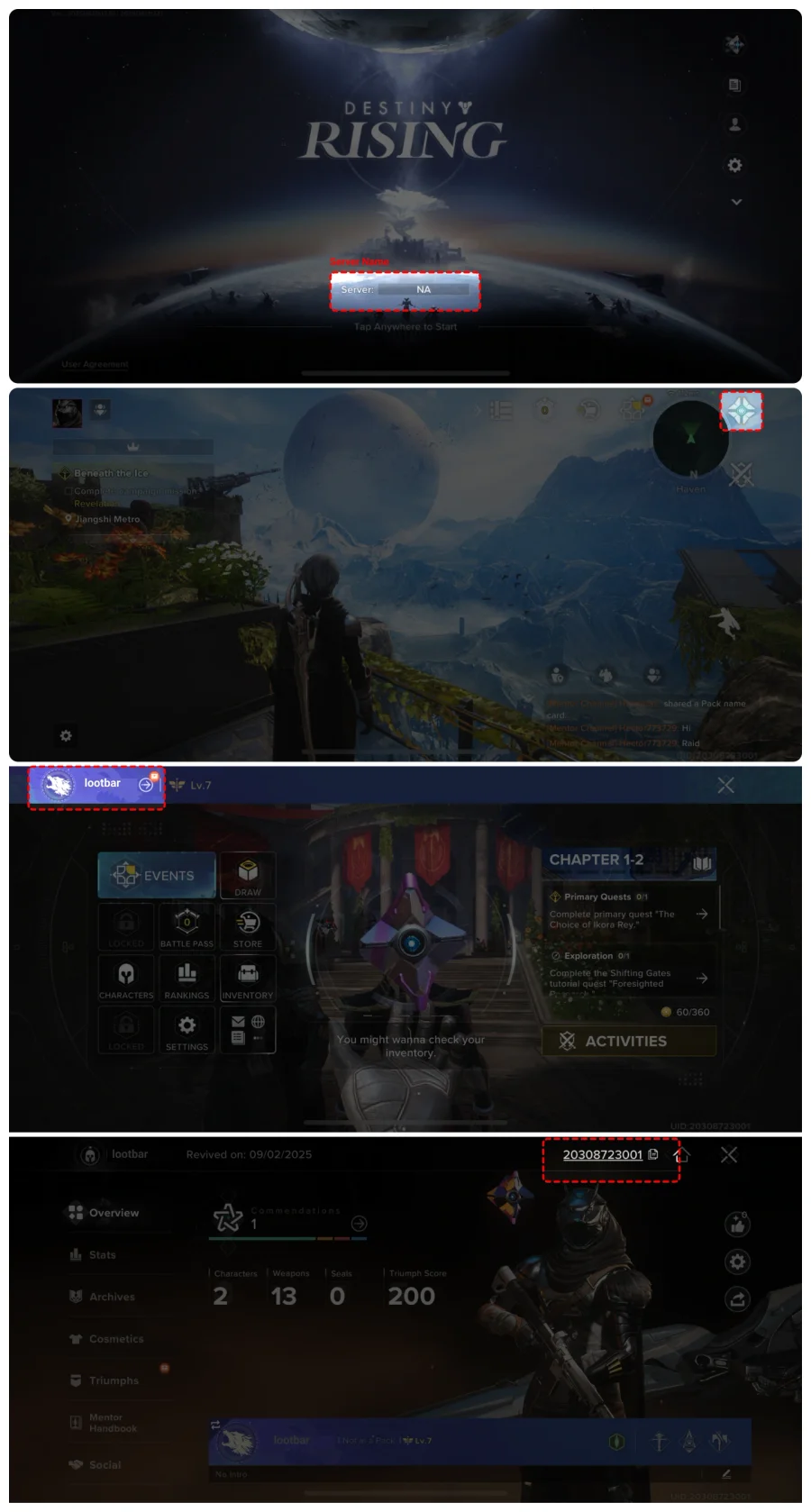
How to obtain Destiny: Rising Server name and UID in-game?
1. You'll see your Server Name on the login page before entering the game
2. After logging in, tap Zev's icon on the upper right corner of the page, and enter your Personal Profile page
3. Tap your in-game name in the upper left corner to enter your character homepage.
4. You'll see your in-game UID on the upper right. Tap the "COPY button" to copy your UID directly.
Terms & Conditions
By clicking “Top-up Now”, I acknowledge and agree that my purchase is non-refundable and confirm that I am of legal majority age (18 years or older in most countries, including the US, EU, and UK). I also agree to and consent to the Terms of Use outlined in the User Agreement.