Apple / iTunes Gift Card Type
Digital Gift Card / E-code
Supported Gift Card Denominations
Applicable Region for US Apple Gift Card Redeem
US Apple ID
Applicable Platform for US Apple Gift Card
Apple Store (online and offline), App Store, iTunes, Apple Music, Apple Books, and other Apple digital content and services
Delivery Method
Auto delivery. An electronic redemption code will be sent to your order completion page.
Delivery Time
Instant delivery within 3 minutes after successful payment
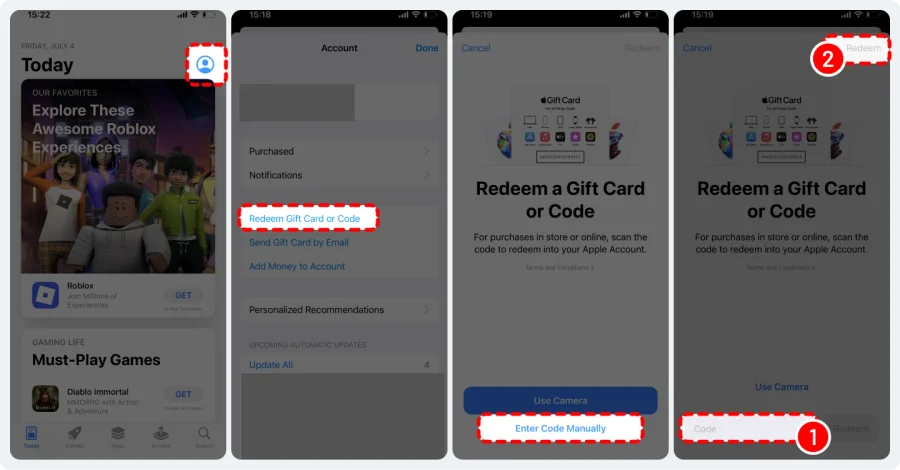
How to Redeem your Apple / iTunes Gift Cards?
Follow these steps to load your card balance into your Apple account:
1. On your iPhone, iPad, or iPod Touch, open the Store.
2. Click 'Account' on the home page.
3. Sign in using your Apple ID if you aren't already logged in.
4. Tap the option to enter the code manually, then enter your 16-digit code from your gift card.
5. Tap 'Redeem', and the balance will be added to your account.
You'll then be able to spend that balance on any digital items available in the store, or use it directly inside your games.